
Mitsubishi Outlander: Steering wheel audio remote control switches*
The remote control switch is located on the left side of the steering wheel. It can be used when the ignition switch is in the “ON” or “ACC” positions.
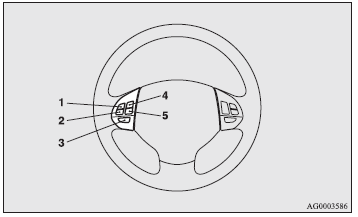
1- Volume up button. 2- Volume down button. 3- Power switch / mode selector button. 4- Seek up / track up / fast-forward button. 5- Seek down / track down / fast-reverse button.
NOTE:
● When operating the steering wheel audio remote control switches, do not operate
more than one at the same time.
Turning on the power
Press the power switch (3) to turn on the power. When you turn the power on, the mode that was selected when the power was last turned off appears. To turn off the power, press and hold down the power switch (3) for about 2 seconds until you hear a beep.
Volume adjustment
Volume up button - 1
While the button is pressed, the volume continues to increase.
Volume down button - 2
While the button is pressed, the volume continues to decrease.
Mode selection
Press the mode selector button (3) to select the desired mode. The mode changes in the following order. FM1 → FM2 → FM3 → MW → LW → CD → FM1
To listen to the radio
Press the mode selector button (3) to select the desired band (LW/MW/FM).
Automatic tuning
Seek up button - 4/ Seek down button - 5
After pressing these buttons, reception of the selected station will begin.
To listen to a CD
Press the mode selector button (3) and select CD mode.
To fast-forward/reverse the disc
To fast-forward/reverse the disc, press the fast-forward button (4) or the fast-reverse button (5).
Fast-forward
You can fast-forward the disc by holding down the fast-forward button (4). While the button is kept pressed, the disc will be fast-forwarded.
Fast-reverse
You can fast-reverse the disc by holding down the fast-reverse button (5). While the button is kept pressed, the disc will be fast-reversed.
NOTE:
● In the case of an MP3 CD, you can fast-forward and fastreverse tracks in the same
folder.
To select a desired track
You can select your desired track by using the track up button (4) or the track down button (5).
NOTE:
● Pressing the track down button (5) once during the song will cause the system
to restart playing from the beginning of the song.
Error codes
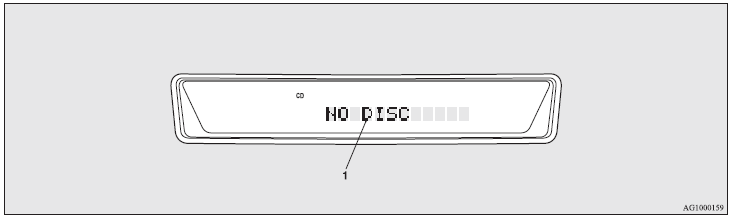
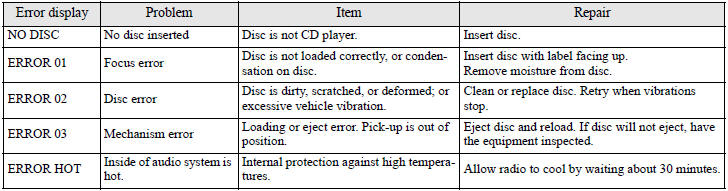
If an error code (1) appears in the display, take action in accordance with the table below.

 LW/MW/FM digital tuning radio with CD changer*
See also:
Bulb Replacement
WARNING:
• Light bulbs can be hot enough to burn your finger right after being turned off.
This is true especially for halogen headlight bulbs. Replace the bulbs after they
become cool enough.
• The headlight bulbs are filled with pressu ...
Electronically controlled 4WD system
The electronically controlled 4WD system is an 4-wheel drive system that allows
one of three drive modes to be selected with a switch, in accordance with the driving
conditions. The following drive modes are available.
4-wheel drive operation ...


