
Mitsubishi Outlander: Ventilators
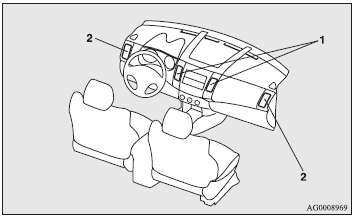
1- Centre ventilators. 2- Side ventilators.
Air flow and direction adjustments
Centre ventilators
Move the knob (A) to adjust the air flow direction. To close the ventilator, fully move the knob (A) to the inner side.
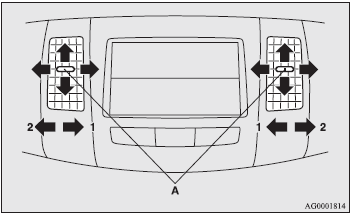
1- Close. 2- Open.
Side ventilators
Move the knob (A) to adjust the air flow direction. To close the ventilator, fully move the knob (A) to the outer side.
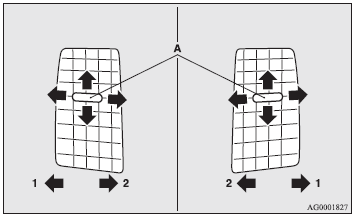
1- Close. 2- Open.
NOTE:
● The cool air from the ventilators may appear as a mist. This is due to moist air
being suddenly cooled by the air conditioning. This will clear after a few moments.
● Be careful not to spill drinks, etc., into the ventilators. Doing so might cause
the air conditioning not to function normally.
Mode selection dial
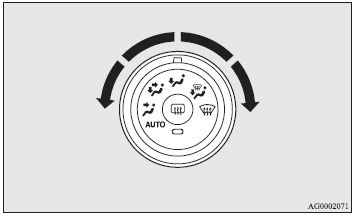
To change the amount of air flowing from the ventilators, turn the mode selection dial.
Changing the mode selection
To change the position and amount of air flowing from the ventilators, turn the
mode selection dial. These symbols are used in the next several illustrations to
demonstrate the quantity of air coming from the ventilators.
 Small amount of air from the ventilators
 Medium amount of air from the ventilators
 Large amount of air from the ventilators
Face position
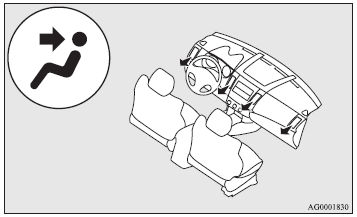
Air flows only to the upper part of the passenger compartment.
Foot/face position
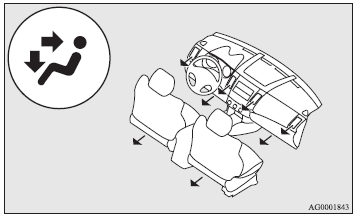
Air flows to the upper part of the passenger compartment, and flows to the leg area.
NOTE:
● With the mode selection dial between the and
and positions, the air flows mainly to the upper part of the passenger compartment.
With the mode selection dial between the
positions, the air flows mainly to the upper part of the passenger compartment.
With the mode selection dial between the and
and positions,
the air flows mainly to the leg area.
positions,
the air flows mainly to the leg area.
Foot position
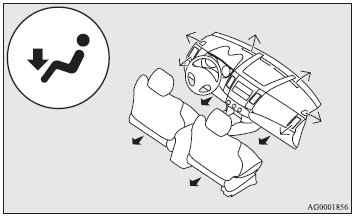
Air flows mainly to the leg area.
Foot/demister position
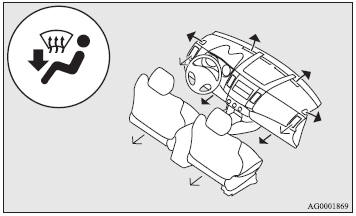
Air flows to the leg area, the windscreen and the door windows.
NOTE:
● With the mode selection dial between the and
and positions, the air flows mainly to the leg area. With the mode selection dial between
the
positions, the air flows mainly to the leg area. With the mode selection dial between
the and
and positions,
the air flows mainly to the windscreen and door windows.
positions,
the air flows mainly to the windscreen and door windows.
Demister position
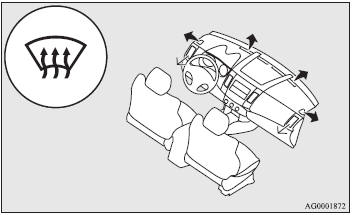
Air flows mainly to the windscreen and the door windows.
 Trailer towing
See also:
Cruise control system
The cruise control system allows you to program the vehicle to maintain a constant
speed without resting your foot on the accelerator pedal. With cruise control, you
can set and automatically maintain any speed of between 40 km/h (24 mph) and 160 ...
Trailer towing
In this section you will find safety tips and information
on limits to the type of towing you can reasonably do
with your vehicle. Before towing a trailer, carefully
review this information to tow your load as efficiently
and safely as possib ...


